
Part 1: The Disc
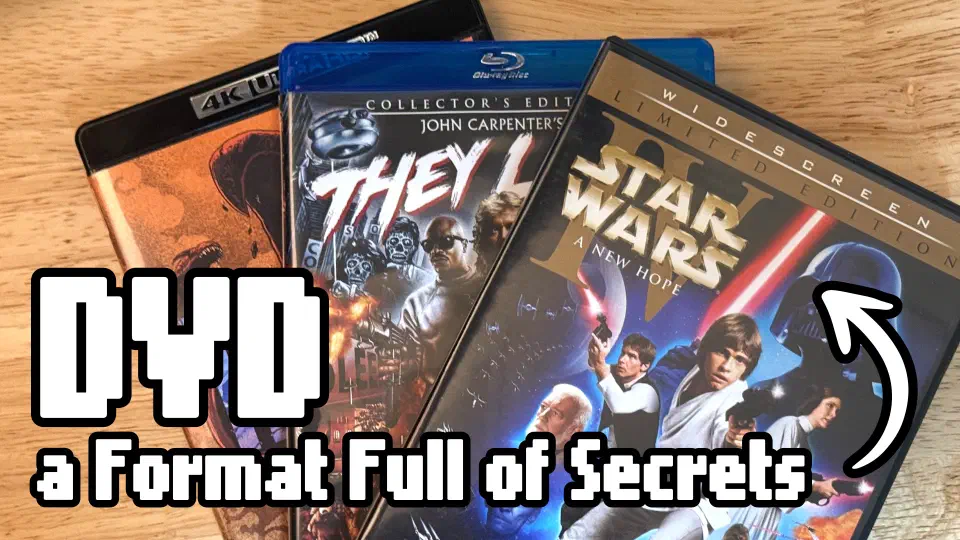
Crack open a clamshell case and pop out a DVD, Blu-ray, or a 4K Blu-ray and they look identical. The same size and shape is not a coincidence. DVD’s inventors deliberately matched the Compact Disc’s 120mm diameter so existing disc factories could be retooled rather than rebuilt. Blu-ray kept the same dimensions for the same reason. Three decades of video format evolution, and the disc in your hand is the same size and shape as a CD from 1982.
When you spin up one of these discs in a player, you’re looking at completely different engineering depending on the format.
The jump from DVD to Blu-ray is more than just a resolution bump. It was a shedding of legacy technology, and the problems DVD had to engineer around were complex.
This is the story on the format. Part two covers the players and what they do with it.
The Big Three
| DVD | Blu-ray | 4K Blu-ray | |
|---|---|---|---|
| Year introduced | 1996 (Japan) | 2006 | 2016 |
| Storage capacity | 4.7–8.5 GB (x2) | 25–50 GB | 66–100 GB |
| Data Layers | 1–2 | 1–2 | 2–3 |
| Native resolution | 480i (SD) | 1080p (HD) | 2160p (4K) |
| Laser wavelength | 650nm (red) | 405nm (blue) | 405nm (blue) |
| Max video bitrate | ~9.8 Mbps | ~40 Mbps | ~128 Mbps |
| Audio | Dolby Digital, DTS | TrueHD, DTS-HD MA | TrueHD, DTS-HD MA + Atmos/DTS:X |
| Dynamic Range | SDR | SDR | HDR10, Dolby Vision, HDR10+ |
DVD’s storage capacity is tiny by modern standards and its max bitrate is low. Those two constraints forced a lot of creative engineering to fit video onto the disc. Some DVDs were readable on both sides to double their capacity and cram even more data on the same disc. With “flippers” you had to stop the player and physically flip the disc like a vinyl record or a LaserDisc.
Blu-ray’s jump to a 405nm blue laser enabled smaller pit sizes and denser data packing. More storage meant less compression and larger resolution video. 4K Blu-ray uses the same blue laser but pushes the format’s storage limits even further.
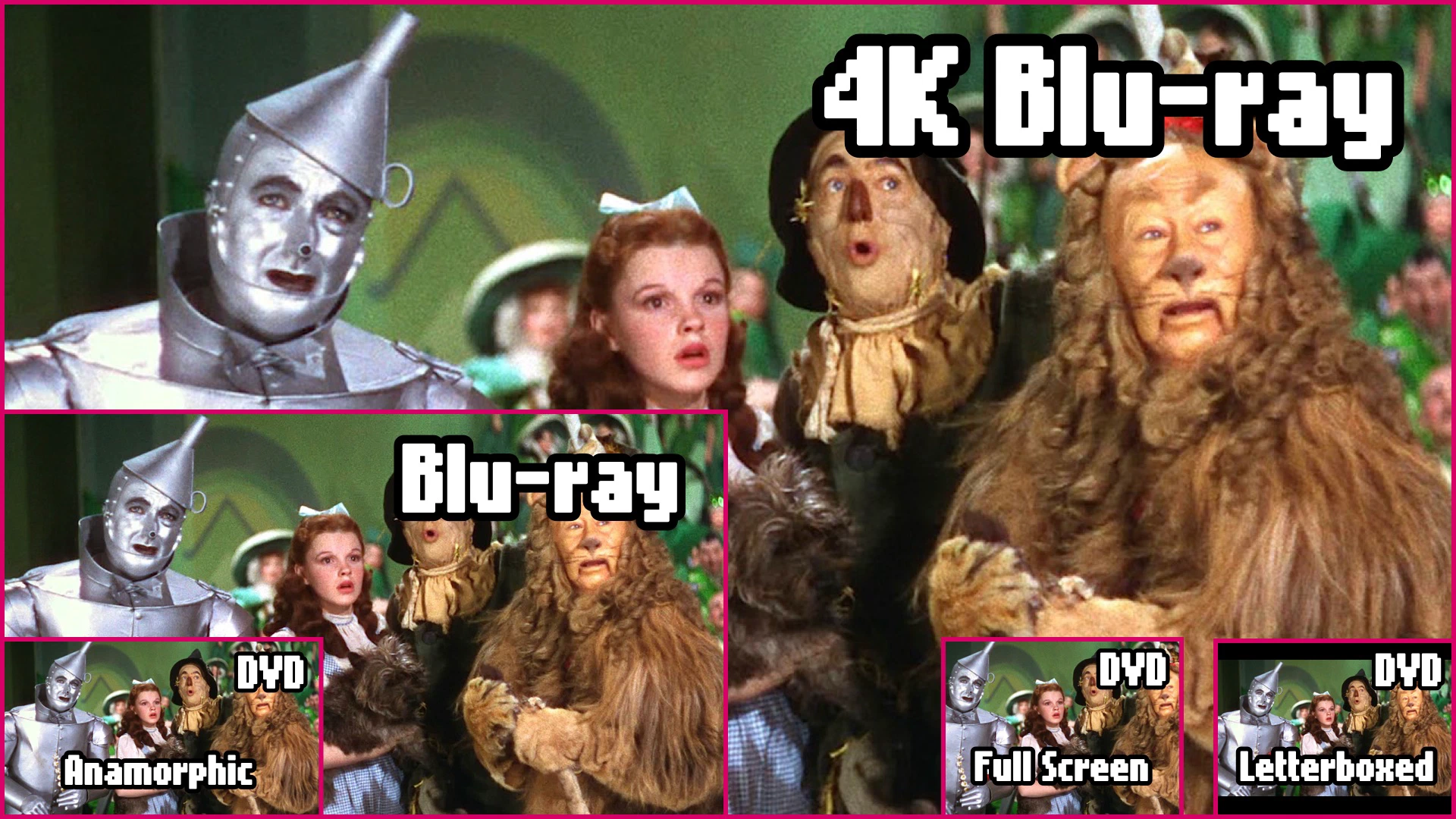
The bitrate column in the table is useful for comparing to streaming. Streaming services deliver 4K at about 15–25 Megabits per second (Mbps) depending on the service. Netflix sometimes streams at less than DVD bitrates. Even the best streaming services top out well below Blu-ray’s 40 Mbps ceiling, let alone 4K Blu-ray’s 128 Mbps.
The resolution numbers might be the same, but the compression level is what makes motion turn into a blurry mess or cause blocky artifacts to appear in dark areas. These aren’t problems when watching from physical discs.
DVD’s Engineering Feats
DVD launched in 1996 and it was impressive for its time. But the format was working under a lot of constraints. It dealt with them in ways that are pretty much invisible to the viewer. The format is doing a large amount of work behind the scenes.
What’s on a DVD
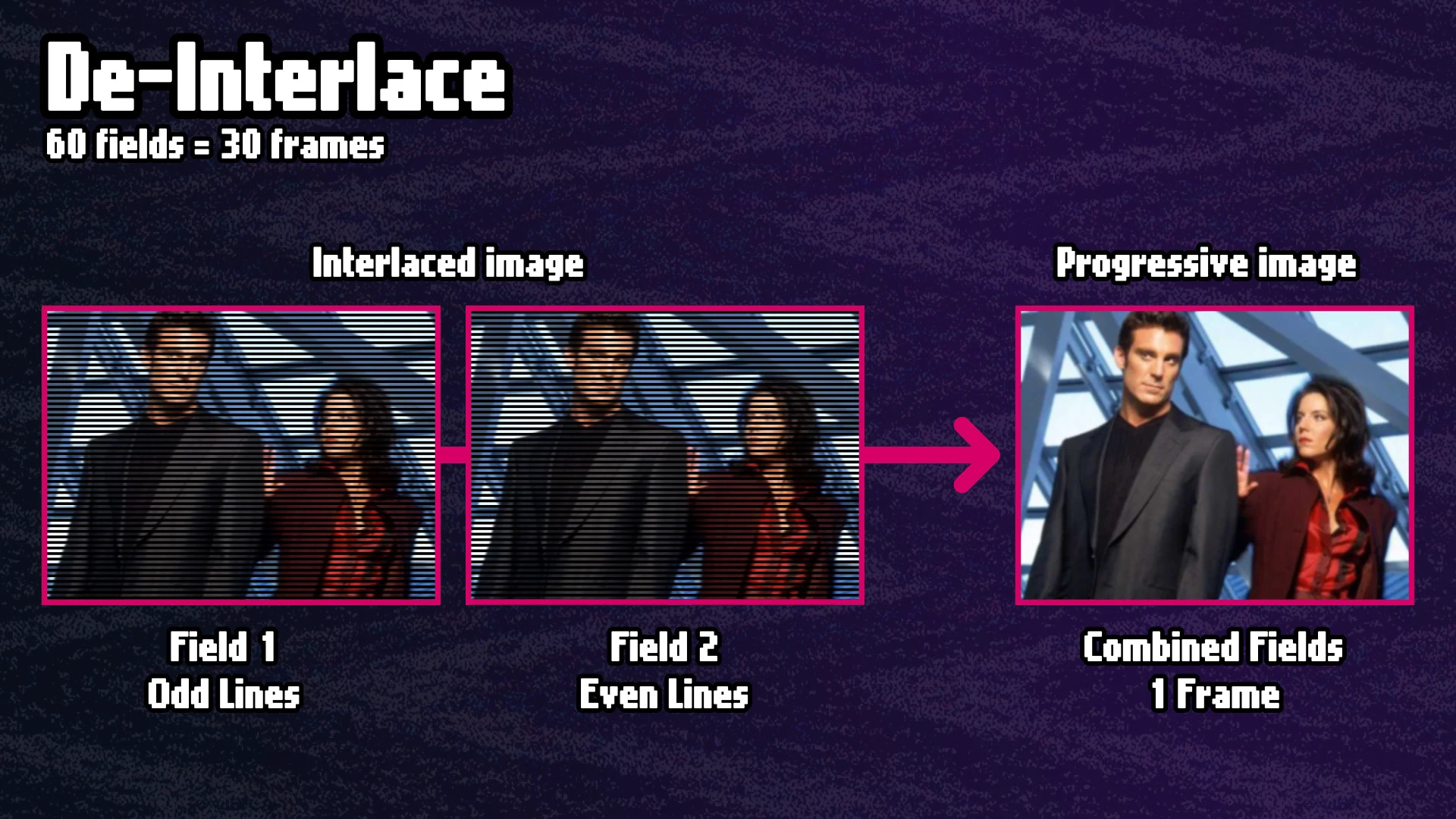
A DVD stores video in MPEG-2 format at 720×480 pixels, interlaced, at roughly 30 frames per second. Interlaced means each frame is actually two fields drawn alternately: first all the odd horizontal lines, then all the even ones. Old, tube-TV, CRT televisions were built for exactly this. The electron beam scanned the screen in that same alternating pattern. (We are just focusing on NTSC to keep this article brief. The PAL standard is different.)
The catch is that virtually all theatrical film is shot at 24 frames per second. So you have a disc format locked to 30 fps and a film library shot at 24 fps. Those numbers don’t divide evenly. How did DVD handle that?
3:2 Pulldown: Making Film Fit
The solution is called 3:2 pulldown, or 2:3 pulldown depending on what frame you start with. There’s a good chance you’ve never heard of it because it just works and there’s only one little tell that it’s happening.
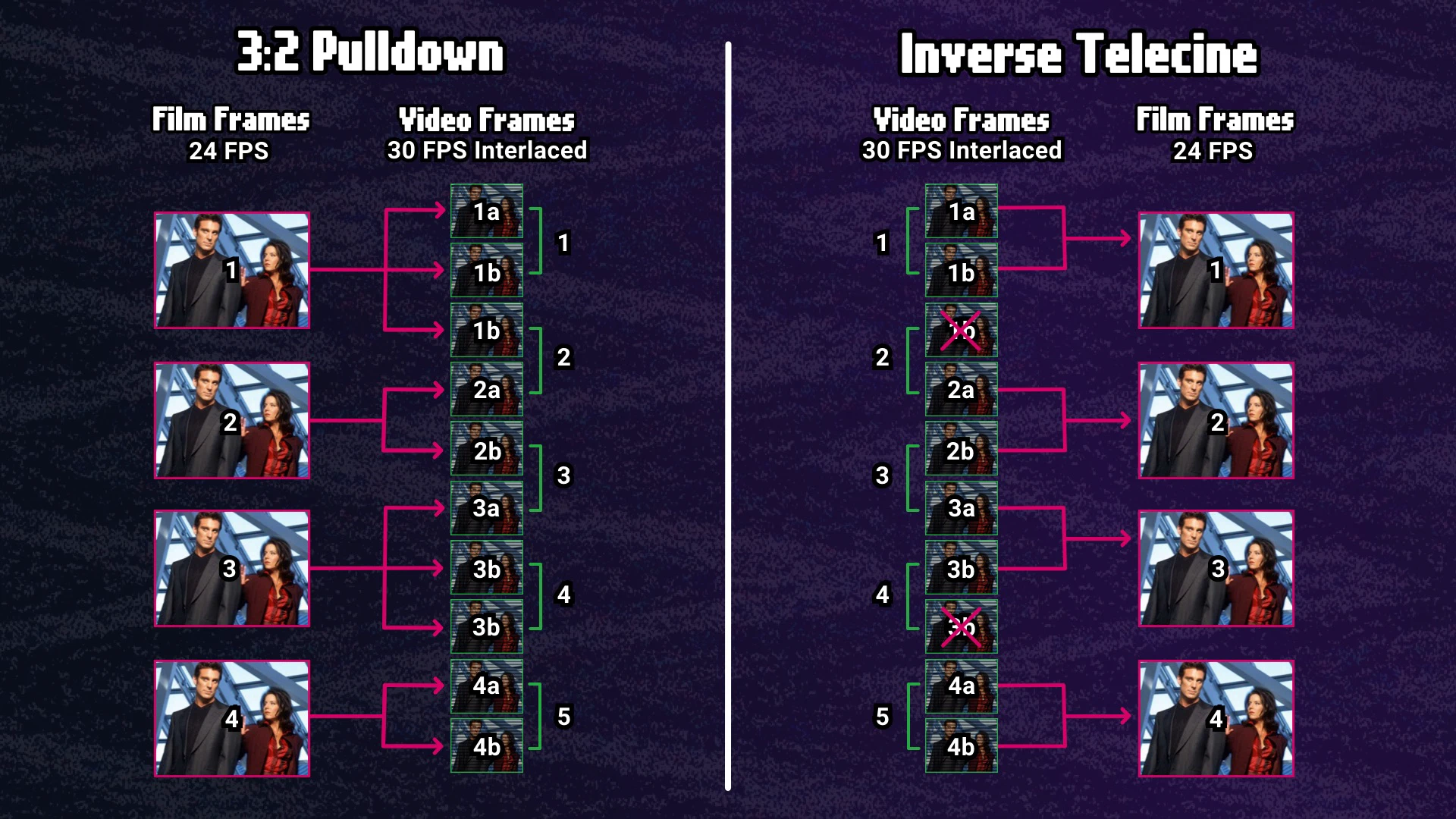
How it works: To get from 24 fps to 30 fps, every group of 4 film frames has to be stretched across 5 video frames. Video frames are made of two interlaced fields each, so that’s 10 fields to fill from 4 source frames.
The fields get assigned in an alternating 3-2 pattern: film frame one gets three fields, film frame two gets two fields, film frame three gets three fields, film frame four gets two fields, and so on. The third fields are duplicates. Ten fields, five video frames, 24 fps film now fits into a 30 fps video stream. Math!
The side effect is a subtle uneven motion called cadence judder. This is from the duplicate fields not evenly spaced in time. TVs are getting better at hiding it, but it’s still there.
Inverse Telecine: Getting the 24 Frames Back
On a CRT with a standard DVD player outputting 480i, the pulldown just plays through as intended. The CRT draws fields the way it was designed to: odd lines, then even lines, 59.94 fields per second. It doesn’t know or care about the 3:2 cadence. It’s displaying the signal exactly as the format was built for.
Then flat screen and digital TVs arrived. A modern flat panel can’t natively handle interlaced content the way a CRT can, so a player reading a 480i source or the TV has to process the signal before it can display it. That process can happen several different ways.
A video player or a TV that supports 480i can undo the pulldown before sending the signal out. By detecting the repeating 3-2 field cadence, it can identify and discard the duplicate fields and reconstruct the original 24 progressive frames. This is called Inverse Telecine (IVTC).
The output is 480p, no interlacing, at the film’s original frame rate. It’s sharper, smoother, and without the combing artifacts that show up on a display that can’t handle interlaced video properly.
The quality of a player’s IVTC matters. A good player detects the cadence reliably and handles scene changes without stumbling. A bad player might miss the cadence, blindly trust incorrect metadata on the disc, or skip IVTC entirely and just line-double the interlaced signal. That last approach is faster and cheaper to implement. (A lot of HDTVs do this with a 480i signal.) It also looks blurry and terrible.
De-Interlacing
Not all DVD content is theatrical film. TV shows shot on video cameras, live concerts, sporting events, making-of documentaries were all recorded at native 29.97 fps with no 3:2 cadence to reverse. The content is interlaced when transferred to a DVD.
To output 480p from native interlaced video, a player has to de-interlace. The quality range here varies a lot. The simplest approach, called bob de-interlacing, takes one field and doubles the lines to fill the frame making a progressive image. It’s lightweight to process, but you lose half your vertical resolution and get visible combing artifacts on anything moving. Like mentioned before, basic line-doubling just doesn’t look good.
Better players use motion-adaptive de-interlacing, which analyzes the content and applies different processing to static areas versus moving ones. The result is significantly better.
Full Screen vs. Widescreen
DVDs shipped in two aspect ratios and the language around them is a little confusing.
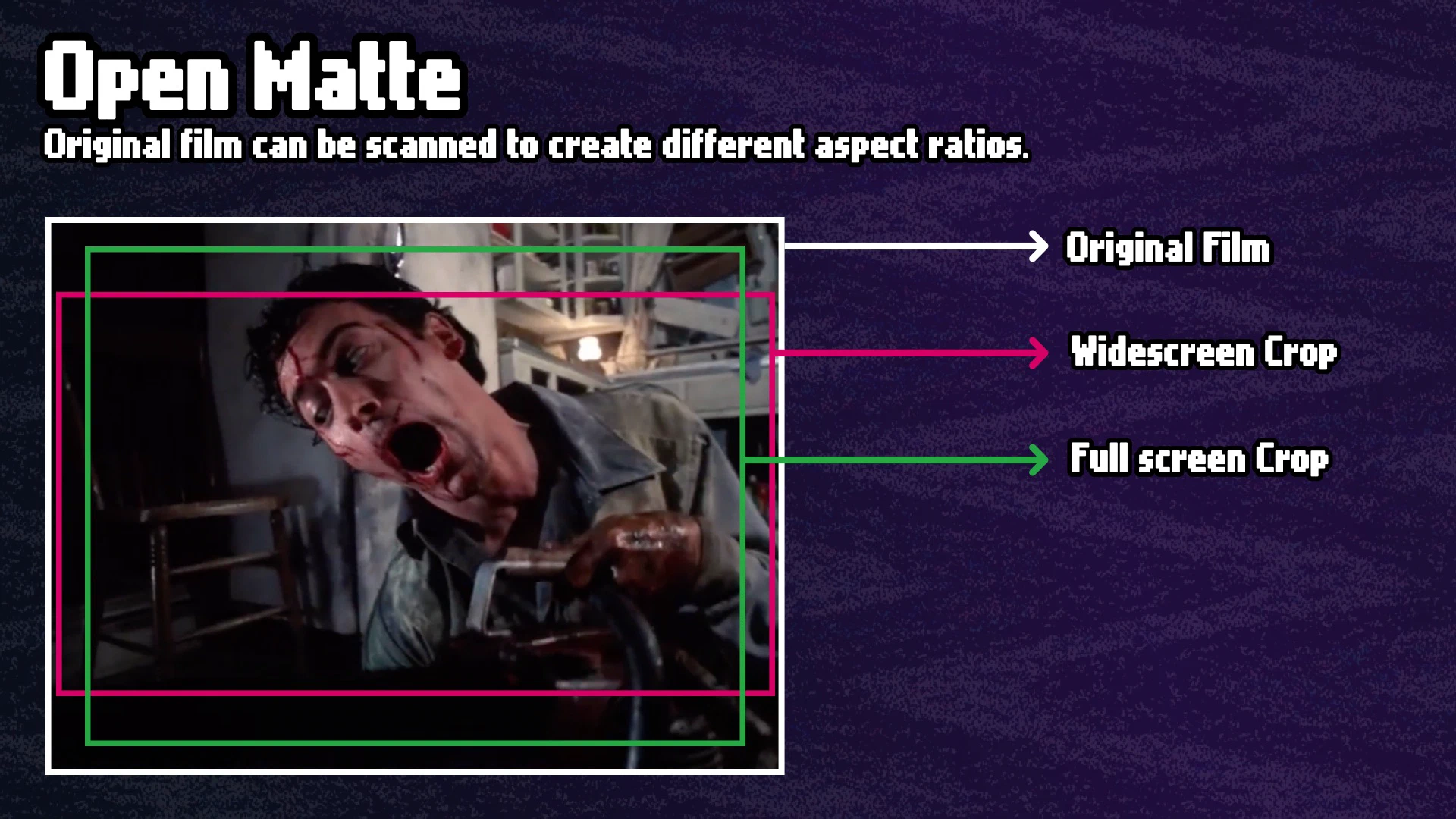
“Full Screen” sounds like more picture, but it’s actually less picture on a widescreen HDTV. A full screen transfer of a theatrical film is cropped to fill a square, 4:3 TV. This is done using a couple of techniques.
One technique is called “Open Matte.” The film was re-scanned from the original negatives and re-cropped for a square screen. This video has some great examples.
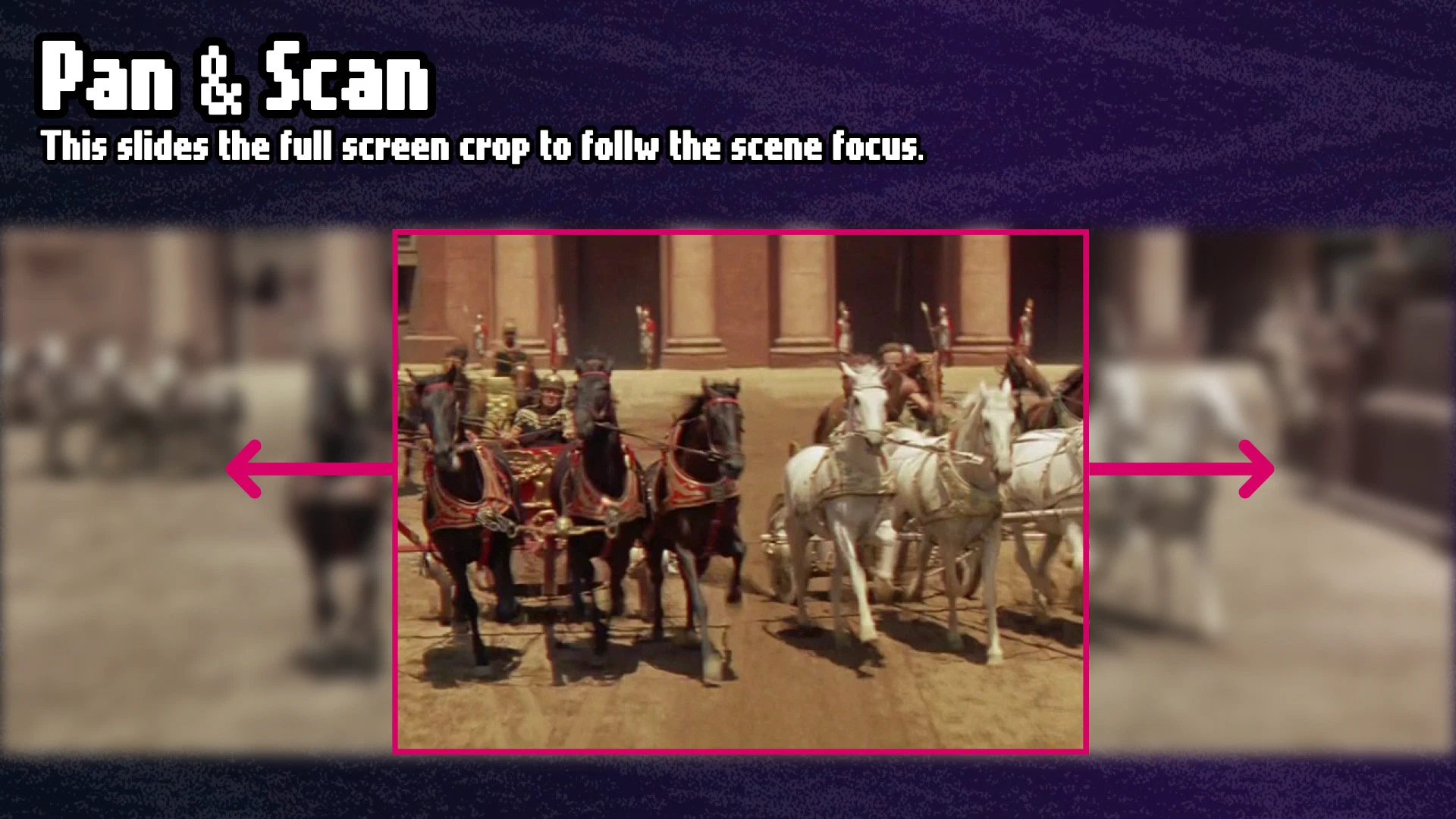
“Pan & Scan” was another technique that was used if an Open Matte scan wasn’t available. The original wide image gets cropped to fit a 4:3 frame, and a mechanical process tracks the center of action across the scene. Generally, this is considered bad and ruins the framing of widescreen films. This Turner Classic Movies video does a good job explaining why.
The rental era had a lot of full screen DVDs (and VHS) because people wanted a picture that filled the screen of the square TVs of the time. The result is a lot of DVDs in circulation that are the Full Frame version, which may be desirable depending on your preference or if you are watching on a CRT.
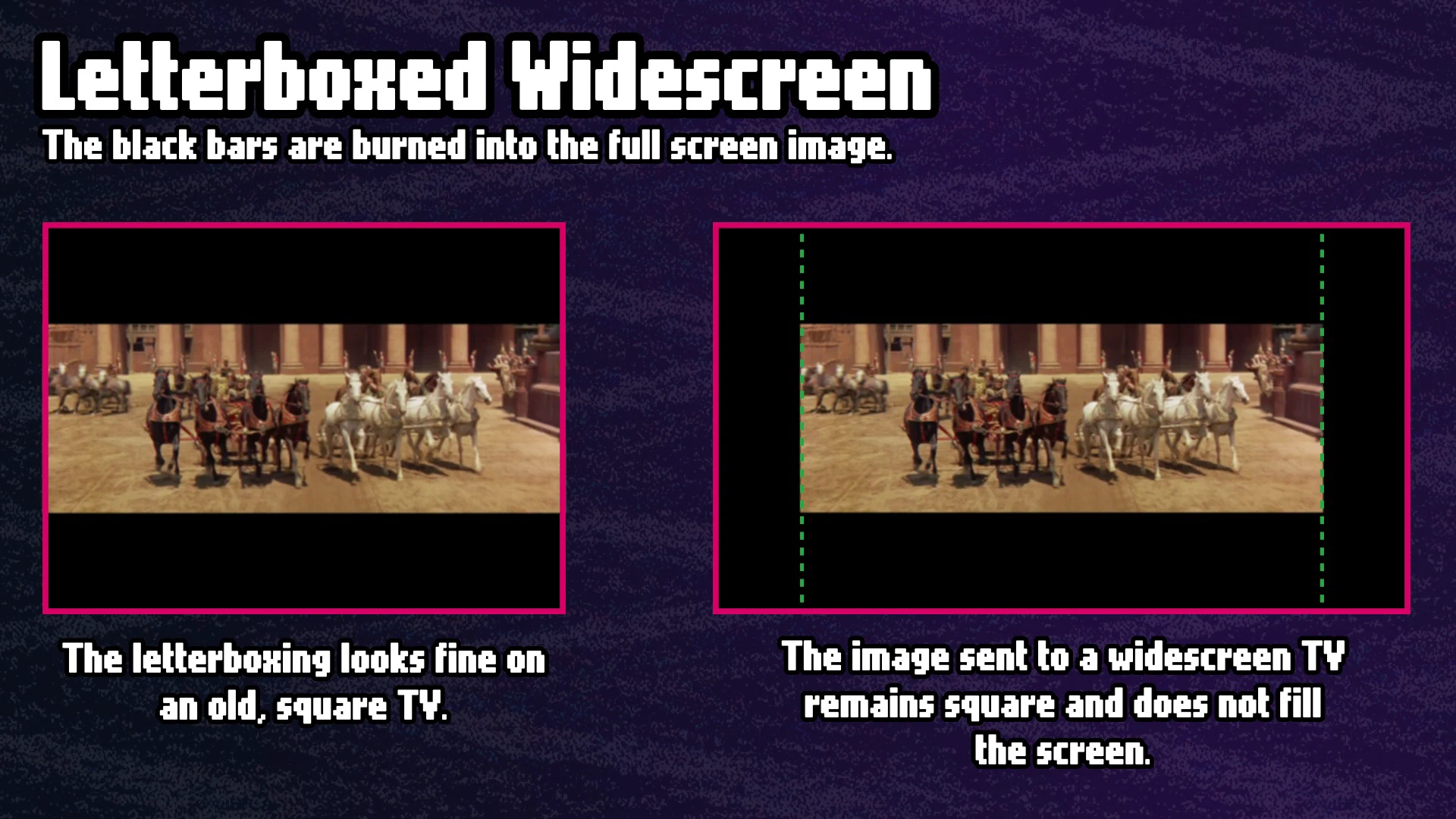
“Letterboxed Widescreen” or “matted widescreen” preserves the theatrical aspect ratio, but this widescreen image is placed in a square frame. Instead of zooming or cropping, like the full screen examples, the empty space above and below the image is filled with black bars. These black bars are baked-in, or part of the output image. They will always be present even when viewing on a widescreen TV.
Some widescreen TVs and video players have a “zoom” option that will zoom in on the letterboxed image so it fills the entire screen. This isn’t ideal, since you are essentially zooming in on an already low resolution picture even more. I avoid this format.
Anamorphic Widescreen: A Clever Pixel Trick
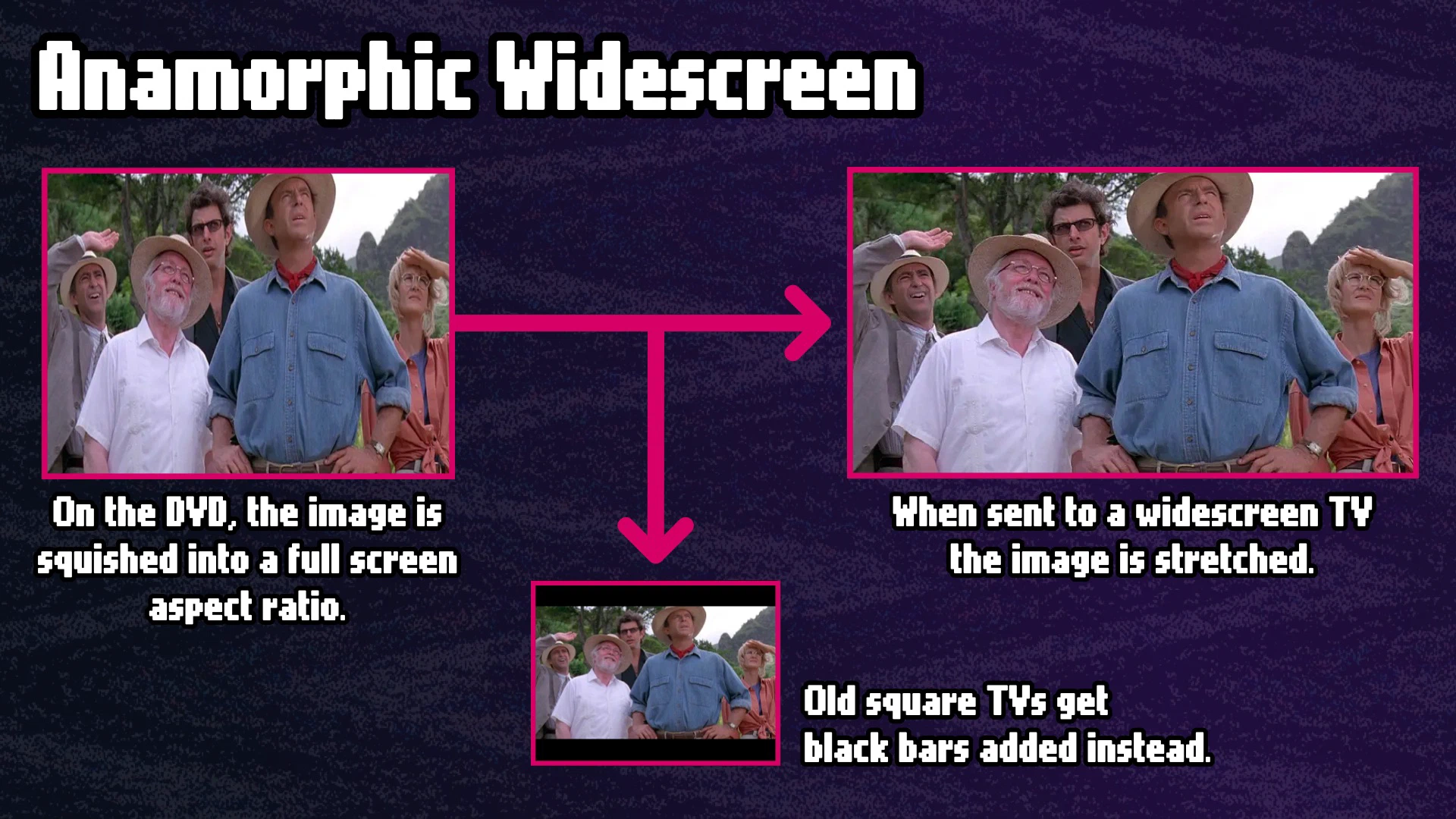
“Anamorphic Widescreen” or “16:9 enhanced,” often just called “Widescreen,” is the desired format for HDTVs. It’s different than letterboxed widescreen in that it squishes the widescreen image into a square format. This fills all 480 video lines in a 4:3 ratio like full screen. The image looks stretched tall if played without correction. The disc flags itself as anamorphic, the player reads that flag and stretches the image horizontally back to the correct aspect ratio.
When displayed in 480i for a CRT, the player adds letterbox bars back in on the fly so the image isn’t stretched tall. Just like letterboxed widescreen. It’s a nifty backwards compatible hack for widescreen support.
What Blu-ray Fixed
Blu-ray launched in 2006 and changed more than resolution and storage capacity. It was able to retire what made DVDs complicated because it no longer had to support CRTs and interlaced video.
A Blu-ray disc stores native 1080p video at the frame rate of the source. Theatrical films that are 23.976 frames per second are stored on the disc as it was shot at the original frame rate. The player reads those frames and sends them to the TV.
For video-sourced content like bonus features, concert films, TV shows, documentaries shot on video cameras, Blu-ray encodes this natively at 60fps. Pixels are square and the aspect ratio is what it is. No pulldown math required and no cadence to manage. Blu-ray handles it cleanly because it isn’t dealing with legacy interlacing.
Blu-ray also upgraded audio. Dolby TrueHD and DTS-HD Master Audio are lossless formats. You’re hearing exactly what was in the studio mix, bit for bit. DVD’s Dolby Digital and DTS are lossy. The audio quality gap between DVD and Blu-ray is significant.
What 4K Blu-ray Added
4K Blu-ray arrived in 2016, and the resolution bump is only part of the upgrade.
3840×2160 is four times the pixel count of 1080p and on today’s huge screens that’s noticeable. The more significant additions are HDR and wide color gamut: more bits per pixel, brighter highlights, deeper blacks, and a color space that matches more closely to what modern cameras capture. A well-mastered 4K Blu-ray doesn’t just look sharper than its 1080p counterpart. It looks different in color, brightness, and clarity.
The bitrate ceiling jumping to 128 Mbps helps high-motion scenes that show compression artifacts on DVD or even Blu-ray remain sharp and clear.
One caveat with 4k: a lot of 4K Blu-ray releases are not sourced from true 4K scans of the original film. Some use a 2K digital source that gets upscaled to 4K for the disc. You still get HDR and wide color gamut on those releases, which is a big improvement. But part of the extra resolution is algorithmic and not in the original source. It varies by title and studio, and it’s rarely disclosed on the packaging.
The Disc is Only Part of the Story
DVD spent ten years doing a lot of adapting to accommodate the frame rate and resolution conversion from analog SD to digital HD screens that also changed aspect ratio. The format was doing incredible engineering work: managing frame rate conversions, aspect ratio tricks, and interlacing in clever ways that viewers never noticed.
Blu-ray got to be simpler because it only had to deal with widescreen HD displays. 4K Blu-ray built on that foundation by adding new display technology found in 4K HDR TVs.

Blu-ray Players and DVDs
It takes a lot of work getting DVD video on an HDTV.
Part two of this series is about the hardware. How does a Blu-ray player handle a DVD with a 4K TV? The answer is: it’s doing a lot!







Start the conversation