

A Notebook and a Pen
Every stray thought, idea, and half-formed plan you have lately seems to end up in the cloud somewhere. Notes apps sync everything automatically, which usually means someone else’s server, and increasingly an AI model, is reading along too. Google doesn’t need a transcript of everything rattling around in your head.
A lot of people have started outsourcing that thinking entirely. AI chatbots like Claude, Gemini, or Chad (that’s a better name than ChatGPT) are great for quick answers: what to make for dinner, how to phrase an email, whether a tomato is a fruit or a vegetable. But for the bigger stuff — should I take this job, should I move, how do I actually feel about this — a fast answer can derail the slow thinking you actually need to do. Those decisions deserve some friction, not instant output.
A notebook and a pen aren’t exactly “tech,” but Long Play Tech isn’t just about gadgets. It’s about finding things that work and keep working, and it turns out one of the oldest tools around still does that, and pairs just fine with everything else in your pocket.
The Case for Pen and Paper
Writing by hand, the old-fashioned way, does something typing doesn’t. Multiple studies suggest handwriting engages the brain differently than typing, and that the physical act of forming letters changes how information gets processed and stored.
It’s also just… offline. No notifications, no autocomplete suggestions, no little red badges demanding attention. A journal makes you present in a way a screen rarely does. If doomscrolling is stealing your time and attention, a journal is one of the simplest ways to take some of it back. Jot down an idea, flip through old pages, sketch out what’s next. It’s time spent on yourself instead of feeding an algorithm’s engagement numbers.
There’s also a lot of talk these days about productivity hacks and using AI to automate your life. That’s fine, but it doesn’t help with intentionality. Why you’re doing any of this in the first place. Where do you actually want to be? What do you want to experience? Bullet journaling forces you to slow down and work that out, so you end up being productive about the right things instead of just busy.
What’s a Bullet Journal?
The Bullet Journal Method, created by Ryder Carroll, is an analog system for tracking the past, organizing the present, and planning the future. It’s more than a to-do list. It’s been described as a mindfulness practice disguised as a productivity system, meant to keep your daily actions in line with what actually matters to you.
I’ve tried a handful of journaling methods, and this is the one that stuck. I started simple, just rapid logging what I did during the day. That made the habit easy to build. I never had to think of something to write, I just logged.
From there I started adding in reflections, thoughts, and a look ahead. Before long I had one notebook that went everywhere with me and held everything (work stuff, personal stuff, all of it) in one place.
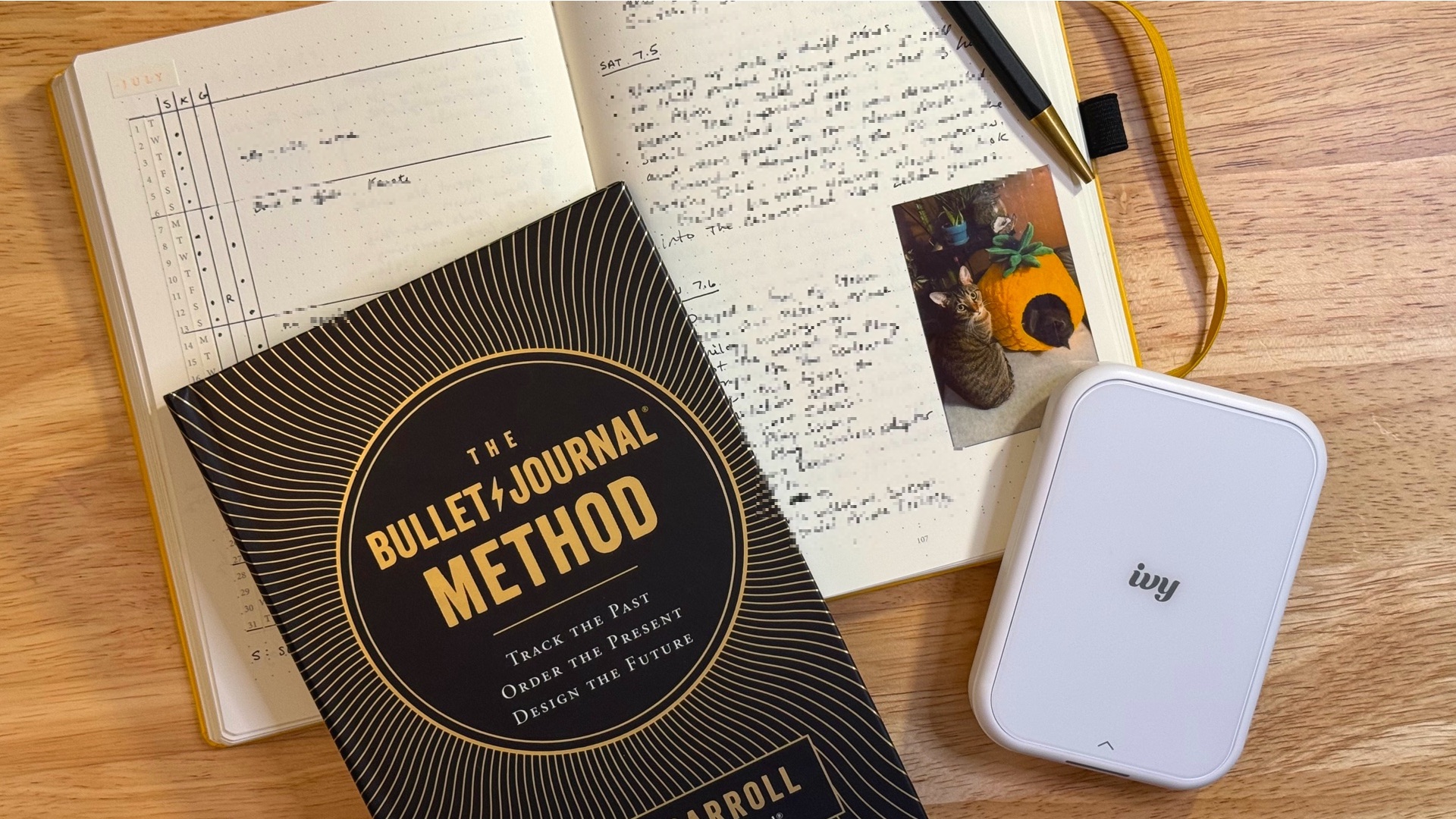
Bullet journals are also completely customizable. Sketch, collage, stamp, whatever you want, there’s no wrong way to do it. I keep mine pretty basic, but I did add a Canon Ivy sticker printer to print little 2x3" photos straight from my phone. A picture’s worth a thousand words, and it’s fun flipping back through actual images of what I was up to.
Core Components
All you really need is a blank notebook and a pen, but I use the official Bullet Journal notebook because it comes with page numbers, stickers for monthly logs, and labels for the index and future log already built in. The grid pattern also has little markers that make it easy to divide pages into halves or thirds.
The method itself is built around a few core structures:
- The Index – a running table of contents at the front that helps you find collections and notes by page number
- The Future Log – an overview, usually about 6 months out, for tasks and events that don’t fit into the current month
- The Monthly Log – a calendar page for events plus a task page for the month ahead
- The Daily Log – your day-to-day catch-all for tasks, notes, and events as they happen
Rapid Logging
Rapid logging is the shorthand system that makes the whole thing fast to write and easy to scan. A handful of symbols cover almost everything:
- Tasks (•) – actionable items, like “reply to emails”
- Events (○) – date-specific things, like a doctor’s appointment
- Notes (–) – facts, ideas, or observations
- Moods (=) – how you’re feeling, emotionally or physically
- Signifiers (*) – extra symbols added next to a bullet for emphasis, like a star for high priority
As you go, completed tasks get an (X). Unfinished ones get migrated (>). They are either carried forward to next month’s log if they still matter, or struck out entirely if they don’t.
Make It Your Own
From here, you can add whatever you want. The Bullet Journal Method isn’t set in stone. Drop what doesn’t work for you and add what does. I found the monthly log page was the perfect spot for a habit tracker. My goals lately have been getting more sleep and hitting the gym more, and just seeing the progress (or lack of it) laid out on the page was motivation enough to keep me on track.
Reflection and Intentionality
The real value of a bullet journal isn’t the logging. It’s the reflection. Regularly reviewing what you wrote helps you see how you actually spent your time, which makes it a lot easier to cut busywork and focus on what’s meaningful.
I review every evening and think about how tomorrow will go. Then once a week, usually on Sunday, I look back at the whole week and review the ups and downs. Then I plan the next one. With a clear picture of where you’ve been and where you are now, it’s a lot easier to figure out where you want to go.
Taking It On the Road
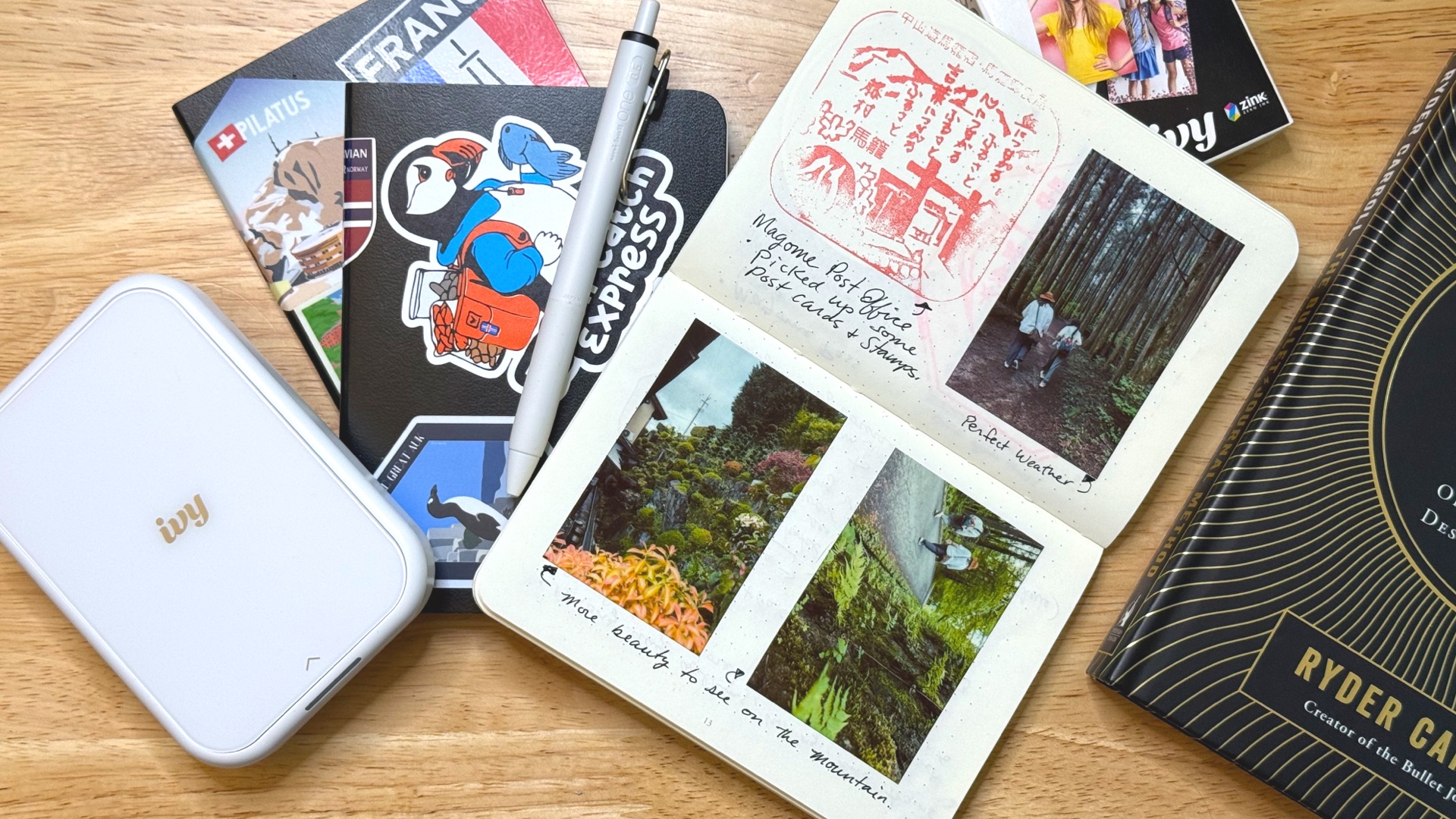
For travel, I switch to the smaller Bullet Journal Pocket instead of my regular one. When on vacation, I want to get away from my day-to-day stuff and leave it at home. I want to have a fresh, isolated experience with its own intentions and goals.
I add stamps and stickers from wherever I visited, and lean even more on the Ivy printer to document the trip visually. They end up as little time capsules of the whole experience.
When I get home, I write down every item I packed and cross out the items I didn’t use. This make planning my next trip easy and lighter. Then I add the travel journal name into my main journal to account for the gap in entries.
What Doesn’t Go in the Journal
Not everything belongs on paper. I still keep a digital calendar that syncs across all my devices. There’s no realistic way for me to manage meetings and appointments without a few notifications and reminders.
Longform writing also stays digital, mostly because spell check is a necessity for anything I’m publishing or sending to someone else. For that, and any other digital notes I want searchable, I use Obsidian. It’s just a folder of plain text files on my device, not synced to Google Drive, and not locked into anyone’s platform. (I back it up myself.) Since it’s all plain text, I can open it with literally any app I want. No lock-in.
Just Get Started
You don’t need the perfect notebook or a fully worked-out system on day one. Start simple. Rapid log what you did today, build the habit, and add reflection, pictures, sketches, and other thoughts over time.
Next time you catch yourself reaching for your phone to doomscroll, try grabbing the journal instead. That urge to scroll is usually just a way to avoid sitting with your own thoughts. A journal lets you sit with them anyway and maybe even figure out what to do next.


Start the conversation